Database Runs (Beta)
Database runs are currently in beta. The API and behavior may change in future releases. Try a run first on a database where a mistake has no consequence, for example one of the demo databases.
A database run reads a database, anonymizes it with the Avatar method, and writes the result into another database. You get a working copy of a production database: the same tables, the same joins and about the same number of rows, without any real individual in it.
Use it to give a test, development or analytics team a database they can query like the real one, without a CSV export in the middle.
Database runs need the database connector, an optional component of the platform. It is enabled on the Octopize SaaS. On a self-hosted installation it is off by default: ask your administrator to enable it. Every other feature works without it.
How a Database Run Works
A database run has four steps. The second step is mandatory.
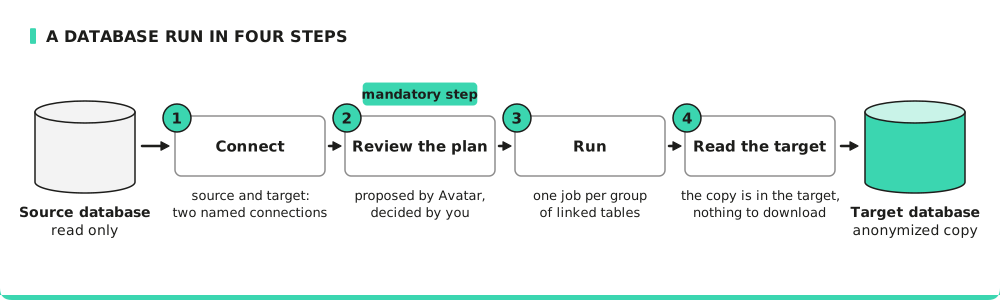
- Connect: you choose a source and a target. Each one is a named connection stored by Avatar. A job carries the name of a connection, never its password.
- Review the plan: Avatar reads the structure of the source (schema discovery) and proposes what to do with each table and each variable (classification). You read the proposal, correct it, and confirm it. A run that contains a proposal that was not confirmed is refused when it starts.
- Run: Avatar copies the database. Tables linked by foreign keys are anonymized together, in one job. Each group of linked tables is a separate job.
- Read the target: the result is the target database itself. There is no file to download. Each job also produces the usual privacy and utility metrics and reports.
You can do all of this from the web client or from the Python client.
What Happens to the Data
Each table gets a treatment (copy, pseudonymize, anonymize, purge or ignore) and each variable an action (anonymize, pseudonymize, freeze or drop). Avatar proposes them from the names and the contents of the variables; you confirm or correct the proposal. Keys are re-issued so that every join still works, and a shared entity gives one individual the same fake identity in every table.
The rules behind these choices, and what they mean for privacy, are described in Database Anonymization. Read it before your first run: in particular, a frozen variable keeps its real values in the copy.
Requirements for the Target
- The target is a different database from the source. A run refuses a target that is the same connection as the source, but two different connections that point at the same database are not detected: check this yourself.
- The target uses the same engine as the source: PostgreSQL into PostgreSQL, MySQL into MySQL. Avatar does not translate a schema between two database engines.
- The target already has the schema: every table that the run writes to, including the tables
you purge, must exist in the target. A run does not create tables in a database it reaches
through the database connector, and refuses to start when a table is missing, naming it. Create
the schema first, for example with
pg_dump --schema-onlyrestored into the target. The demo targets already have the schema of their demo source. - A target table that already holds rows is refused, unless you ask the run to empty the target first (Empty this target before writing in the web client). The Python client does not offer this option yet.
Every check happens before the first row is written. The error messages name tables and variables, never values.
How the Target Is Emptied
When you ask for the target to be emptied, the run deletes the rows of the tables it writes to,
and only of those tables. It never deletes a table. The rows are deleted with DELETE, children
before parents, in one transaction. ClickHouse uses TRUNCATE TABLE on each table, and MongoDB
deletes the documents of each collection.
The run refuses to empty the target when a table it does not write to has a foreign key with an
ON DELETE action (such as CASCADE or SET NULL) into a table it writes to: deleting the rows
would change a table that the run was not asked to touch.
Credits
A database run is charged per table: each group costs 1 credit per table that it anonymizes or pseudonymizes. Tables that are copied, purged or ignored are free. Schema discovery, the extraction of the rows, and the resolution of shared entities are free. See Credits.
Where to Go Next
- Database Anonymization: what happens to each table, each variable and each key.
- Database Connections: what you can connect to, and how to add a connection.
- Run a Database Copy in the Web Client
- Run a Database Copy with the Python Client
- For administrators: enable the database connector on a self-hosted Kubernetes installation.