Database Anonymization (Beta)
Database anonymization is currently in beta. The API and behavior may change in future releases. Try it first on a database where a mistake has no consequence, for example one of the demo databases.
Avatar can read a database, anonymize it, and write the result into another database. The result is a working copy of a production database: the same tables, the same joins and about the same number of rows, without any real individual in it.
This page explains what Avatar does to each table and each variable of the database. It builds on the relational database method, which anonymizes linked tables together, and on pseudonymization, which replaces direct identifiers. To run one, see Database Runs in the user guide.
What Happens to Each Table
Each table gets one treatment:
| Treatment | The table in the target |
|---|---|
| copy | the same rows, unchanged. Use it for a lookup table. |
| pseudonymize | the same rows. The personal values are replaced by fake values. |
| anonymize | synthetic rows, generated with the Avatar method. |
| purge | the table is there, with no rows. Use it for an audit log. |
| ignore | the table is not in the target at all. |
purge and ignore are different on purpose. After purge, an application can query the table and find it empty. After ignore, the table does not exist.
Avatar never proposes purge or ignore: only you know that an audit log must be emptied.
What Happens to Each Variable
The web client and the Python client call a variable a column, as databases do. Inside a table, each variable gets one action:
| Action | The values in the target |
|---|---|
| anonymize | synthetic values, drawn from the distribution of the variable. |
| pseudonymize | fake values of the same kind (an email for an email), applied consistently. |
| freeze | the original values, unchanged. |
| drop | the variable is not in the target at all. |
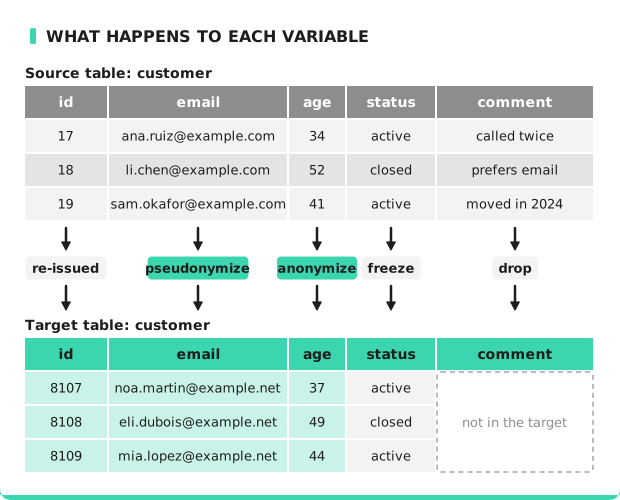
To choose, ask what the users of the copy need from the variable:
- A value that must look real but belong to no individual, such as a name or an email: pseudonymize.
- A number or a category whose distribution matters, such as an amount or an age: anonymize.
- A code that an application filters on, such as a currency or a status, and that identifies no individual: freeze.
- A value that no user of the copy needs, such as a free-text comment: drop.
Anonymization resamples: it draws values from the real distribution. A real value can appear in the copy, attached to a different individual. That is correct for an amount and wrong for an email address. Direct identifiers must be pseudonymized: see Pseudonymization.
A frozen variable keeps its original values in the copy. Freeze only a variable that identifies no individual, on its own or combined with other variables. A frozen variable that identifies someone, or that can single out an individual together with other variables, leaks personal data into the copy. See Privacy metrics for the risks of singling out, linkability and inference.
A binary variable, such as a photograph or a scanned document, is emptied in the copy by default.
What Avatar Proposes
Classification reads the name of each variable first. A variable called email holds an email.
When no rule applies, a model makes a guess, with a confidence. The proposal follows three rules:
| What Avatar found | What it proposes |
|---|---|
| a variable classified as personal | pseudonymize |
| a primary key or a foreign key | nothing: the run handles it |
| any other variable | anonymize |
A table where no variable is recognized is proposed for anonymization, not for copy. A table can identify individuals through a combination of variables that no rule detects.
You only need to confirm the variables that the classifier had an opinion about. Rejecting a proposal is also a decision, and Avatar records it as one.
Keys and Joins
Primary keys and foreign keys take none of the variable actions. The run re-issues every primary key: it replaces each key by another value and changes every foreign key that points to it. All joins still work in the target.
The consequence: key values change. If an application or a test fixture queries
WHERE country_code = 'FR' and country_code is a key, it will not find the row. Keeping a key
value unchanged is not available yet. Freezing a key is refused, because a frozen foreign key
whose parent moved is a broken join that goes unnoticed.
Sequences
If a variable gets its values from a sequence (for example a PostgreSQL SERIAL column), the
sequence in the target does not know about the copied rows. Ask the run to continue the
sequence after the copied rows, or the first row that your application inserts collides with a
copied one. You can also restart the sequence, or start it at a value of your choice.
The Python client and the YAML configuration set sequences. The web client does not set them yet.
One Individual, One Identity: Shared Entities
A customer's email can be in the customer table and in the invoice table. If the two
variables are pseudonymized separately, the same individual gets two identities, and the joins
that a test database must exercise break.
A shared entity says that several tables describe the same thing (an individual, a product, a site) and names the variable that identifies it. The run replaces it once, and uses the same replacement in every table and in every job of the run.
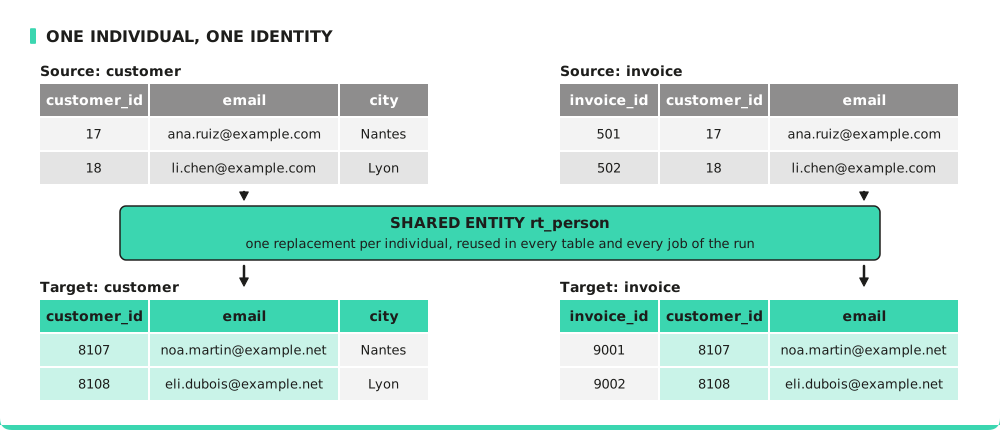
The web client calls a shared entity a reference table.
A shared entity can also span several databases: for example, a CRM and a billing system that describe the same customers. Run them together, in one run, so that a customer gets the same fake identity in both copies.
A replacement depends on the full set of entities that the run collects. If you add a third database to the run later, every fake identity changes, in all the copies. A refreshed set of copies with an extra source shares no individual with the previous one.
Groups of Tables
Tables linked by foreign keys must be anonymized together, as for any relational database. Tables that are not linked are separate datasets that happen to be in the same database. Avatar finds these groups and runs one job per group. You do not arrange this yourself.
Status, failure and retry are per group. A failed group does not undo the work of the other groups. All the jobs of a run use the same seed, so that they agree about every shared entity. Each group produces its own privacy and utility metrics and reports.
In Practice
- Database Runs: how a run proceeds, and what the target database must satisfy.
- Run a Database Copy in the Web Client
- Run a Database Copy with the Python Client